A spreadsheet is a genuinely good project tracker for a freelancer with two or three clients. It's flexible, free, and doesn't require learning new software. The problem isn't spreadsheets themselves — it's not noticing when your business has outgrown what a spreadsheet can reasonably do, and sticking with it out of habit while things start slipping.
- A spreadsheet is a good tracker until duplicated data and hidden deadlines start costing you time.
- Each stage of growth needs a slightly different setup, so move up only when the current one hurts.
- Migrate with three real projects first, and keep the old sheet as a backup for a month.
Here are five signs that switching is worth the short-term hassle.
1. You're duplicating information across multiple tabs
If you've built a "master tracker" tab that summarizes what's happening in five other client tabs, and you're manually updating both whenever something changes, you've built a database by hand — badly. Dedicated project management tools solve this natively: update a task once, and every view that references it updates automatically.
2. Deadlines live in your head, not in the sheet
Spreadsheets are bad at answering "what's due this week across all my clients?" without a lot of manual sorting and filtering. If you find yourself mentally cross-referencing three tabs to figure out what's urgent, or you've missed something because it was on a tab you didn't open that day, the tool is actively working against you rather than for you.
3. You need someone else to see status without asking you
Once you bring on a subcontractor, collaborator, or even just want a client to check progress without emailing you, spreadsheets get awkward fast — either you're sharing edit access to something meant to be your internal notes, or you're maintaining a second "client-facing" version that drifts out of sync with the real one.
4. You're tracking time, budget, and tasks in three different places
Many freelancers start with a spreadsheet for tasks, a separate timer app for hours, and yet another tool or notebook for budget tracking. If reconciling these at invoice time takes more than a few minutes, or if you've ever under-billed because you forgot to log time somewhere, the fragmentation itself is costing you money.
5. Adding a new client means copying and rebuilding a tab
If onboarding a new client involves duplicating a tab and manually rebuilding formulas, you're doing setup work that dedicated tools handle with a template or a single click. This is a small annoyance at three clients and a real time cost at ten.
What to do about it
You don't need the most feature-heavy project management software on the market — in fact, over-featured tools create their own version of the spreadsheet problem, just with more buttons. Look for something that handles the specific pain points above: one place to see deadlines across all clients, shareable views without exposing your whole workspace, and built-in time tracking if that's currently a separate tool for you.
Migrate one active client first rather than moving everything at once. It's the fastest way to find out whether a tool actually fits how you work, before you've invested a weekend rebuilding every project you're currently running.
How to migrate without losing a week to it
The biggest reason freelancers put off switching tools, even after recognizing they should, is the fear of a disruptive migration. A few habits make it far less painful:
- Migrate active work only. Don't try to import years of completed project history into a new tool. Start the new system with what's currently in progress, and let finished projects stay archived in the old spreadsheet for reference.
- Run both systems in parallel for one week, for one client only. This surfaces gaps in your new setup — a status category you forgot to create, a field you actually needed — while the stakes are limited to a single project instead of your whole business.
- Rebuild your templates, don't just copy your columns. A spreadsheet's column structure often reflects the tool's limitations more than your actual workflow. Use the migration as a chance to ask what information you actually need to see, rather than recreating the same layout in a new interface.
What "good enough" looks like at each stage
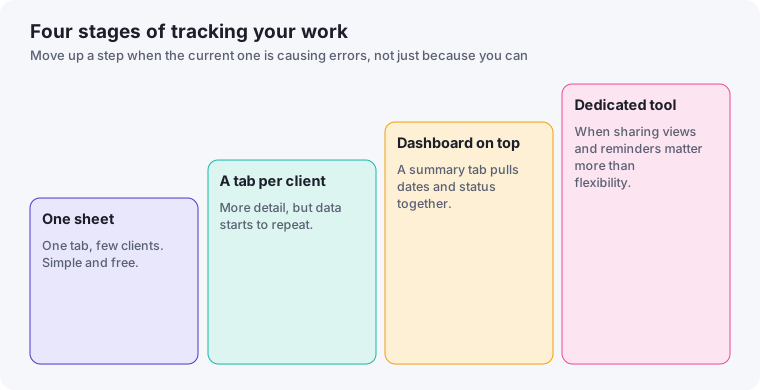
A useful way to think about this: at one to two clients, almost any system works, including a notebook. At three to six clients, a well-organized spreadsheet is often still perfectly adequate, as long as you're disciplined about it. Past six to eight active clients, or the moment you bring on any kind of collaborator, dedicated software starts paying for itself in reduced mental overhead — even before accounting for the specific features it adds. Recognizing which stage you're actually in, rather than switching tools reflexively whenever something feels slightly disorganized, keeps you from over-investing in software you don't need yet.
A fifteen-minute spreadsheet stress test
Before deciding to switch, test how your sheet holds up. Set a timer and try to do these things without asking yourself where to look:
- List everything due in the next seven days, across all clients.
- Find the last message or decision on a specific project from three weeks ago.
- Work out which client you are behind on, without opening any project files.
- Add a new client and project, with all the fields you normally need.
- Check how many hours you have logged against a fixed-price project.
If you finish most of these quickly, the sheet is doing its job, and you may only need a tidier layout. If you struggle with several, the pain is real and worth solving.
Fix the sheet before replacing it
Sometimes the problem is the structure, not the medium. Consider a single "master" tab where each row is a task or milestone with columns for client, project, due date, status and next action. Filter it by client or date rather than keeping separate tabs. Add conditional formatting for anything due within three days. Many of the signs in this article disappear with that one change, and you'll be better informed about what you need if you do move to a dedicated tool.
Migration checklist
- Write down the fields you rely on and check the new tool can hold them.
- Import or recreate three active projects first.
- Run both systems side by side for one or two weeks.
- Only add your remaining projects when the new tool feels reliable.
- Keep the spreadsheet, read-only, for at least a month afterwards.
What to keep in a spreadsheet anyway
Even after moving your projects, a spreadsheet remains handy for things tools handle awkwardly: a quick income overview, a list of pricing experiments, or a personal log of what each client project taught you. Choosing a dedicated tool doesn't mean abandoning the spreadsheet entirely. It means giving each job to the tool that suits it, which our guide on choosing project management software explores in more depth.