Invoicing tools have quietly become one of the more useful categories of AI-assisted software for freelancers — not because generating an invoice is hard, but because the surrounding tasks (chasing late payments, drafting proposals, reconciling hours) used to eat far more time than the invoice itself. Here's what the AI features in this category actually do, and how to figure out which ones matter for your specific billing pain points.
- Name the specific invoicing task that costs you time before comparing any tools.
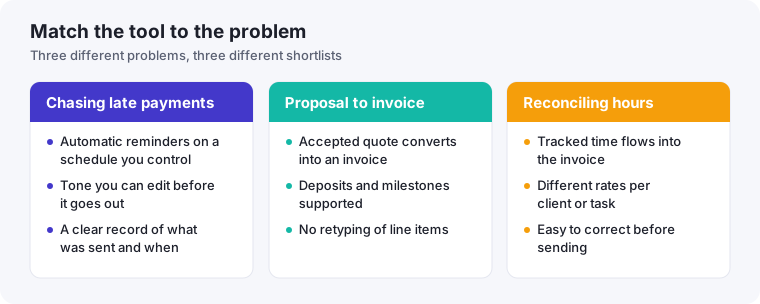
- Chasing late payments, turning proposals into invoices and reconciling hours are three different problems that need different features.
- Judge a tool by a 30-day trial on real invoices, not by its demo.
Pricing and feature sets for these tools change frequently. Treat the categories below as a research starting point and confirm current details directly with each provider.
Identify your actual pain point first
"Better invoicing" means different things depending on where your current process breaks down. Before comparing tools, get specific about which of these is really costing you time or money: writing invoices from scratch each time, forgetting to follow up on overdue payments, reconciling tracked hours against what you actually bill, or drafting proposals before an invoice is even relevant. The right tool depends heavily on which of these is your real bottleneck.
Automated payment follow-ups
This is arguably the highest-value AI feature in modern invoicing tools: automatically sending polite, professionally worded reminders when an invoice goes unpaid past its due date, without you having to remember or draft an awkward follow-up message yourself. Tools like FreshBooks build this in as a standard feature, and it directly addresses one of the most common freelance cash-flow problems — invoices that go unpaid not out of refusal, but because they were simply forgotten by the client.
Proposal-to-invoice workflows
Tools like Bonsai combine proposal generation and invoicing into one workflow, using AI to help draft an initial proposal from a short project brief, which then converts directly into an invoice once accepted — removing the step of re-entering the same project details twice. For freelancers who send several new proposals a month, this consolidation saves more time than any single "smart" feature within either tool alone.
Expense and time reconciliation
Some tools now use AI to flag likely-billable expenses from connected accounts, or to catch a mismatch between logged hours and what's about to be invoiced — a smaller feature, but one that catches real revenue that would otherwise slip through from simple forgetfulness rather than any complicated error.
A simple decision framework
- If late payments are your biggest problem: prioritize automated follow-up sequences over any other feature.
- If you send frequent custom proposals: prioritize a combined proposal-and-invoicing tool over a pure invoicing tool.
- If your billing is simple and mostly on-time: a lightweight, low-cost invoicing tool without heavy AI features may genuinely be enough — don't pay for a feature set solving a problem you don't have.
What these tools don't fix
No invoicing tool, however capable, fixes a pricing structure that doesn't cover your costs, or a client relationship where late payment is a pattern rather than an occasional slip. If you notice the same client repeatedly needing multiple follow-ups regardless of which tool sends them, that's a conversation about payment terms — deposits, shorter payment windows, or reconsidering the relationship — not a software problem. Automating a bad process makes it run more smoothly without making it good.
How this connects to payment structure
Invoicing tools handle the mechanics of billing well, but they don't fix a payment structure that sets you up for cash flow trouble in the first place. As covered in our guide to structuring rates and payment terms, deposits, milestones, and shorter payment windows address the underlying risk; invoicing software addresses the administrative overhead of managing whatever structure you've chosen. Both matter, but they solve different parts of the same broader cash flow problem, and a great tool paired with poor terms will still produce late payments — just with nicer-looking reminder emails.
Evaluating a tool switch honestly
If you're considering migrating to a new invoicing platform specifically for its AI features, weigh the migration cost honestly: moving client records, re-creating recurring invoices, and relearning a new interface all take real time up front. For a freelancer with a handful of clients and simple billing needs, the switch may not pay for itself for months, even if the destination tool is genuinely better. This is worth factoring in before switching tools purely because a comparison article ranked one option higher than what you're already using.
A final practical check before switching
Before committing to a new tool, export a full history from your current one, even if you don't plan to migrate old records immediately. This single step prevents the worst-case outcome of a rushed platform switch — losing access to historical invoices or client payment records because the export window closed before you got around to it.
Questions to ask before you switch
Moving invoicing to a new tool is a small project, and it touches your income, so it deserves a few minutes of scrutiny. Before you sign up for anything, write down answers to these questions:
- Which invoices am I actually late on, and why? If the cause is unclear terms or no deposit, no tool will fix it. See our guide on structuring rates and payment terms.
- Can I export my data? You should be able to download your clients, invoices and payment history in a common format such as CSV or PDF, in case you leave.
- Which currencies, taxes and invoice formats do my clients need? Requirements differ by country, so check the tool's documentation against your own situation, and ask your accountant if you are unsure.
- What happens to my clients' details? Invoices contain names, addresses and amounts. Read how the provider stores and protects that information.
A 30-day trial scorecard
Trial periods are most useful when you decide in advance what success looks like. Copy this table into a note and fill it in during the trial, using your real invoices rather than sample data.
| Criterion | What good looks like | Your result |
|---|---|---|
| Time to send a normal invoice | Noticeably shorter than your current process | |
| Reminders | Go out without you, and you approve the wording | |
| Mistakes caught | Wrong amounts or missing details are easy to spot before sending | |
| Client reaction | Clients can view and pay without asking questions | |
| Cost against benefit | The monthly price is clearly less than the time or late payments it saves |
Keep a human step at the end
Even if a tool drafts line items or writes the reminder for you, read every invoice before it goes out. An invoice is a financial document, and an automatic mistake, such as the wrong client name or a duplicated line, is more damaging to trust than a slightly slower process. Treat the tool as a fast assistant, and keep the final check as your own.