Freelancers who bill by the hour lose real income in a way that's easy to miss: not from working too little, but from under-logging the time they actually worked. A quick email reply here, fifteen minutes of revisions there — individually forgettable, collectively a meaningful chunk of unbilled time by the end of a month.
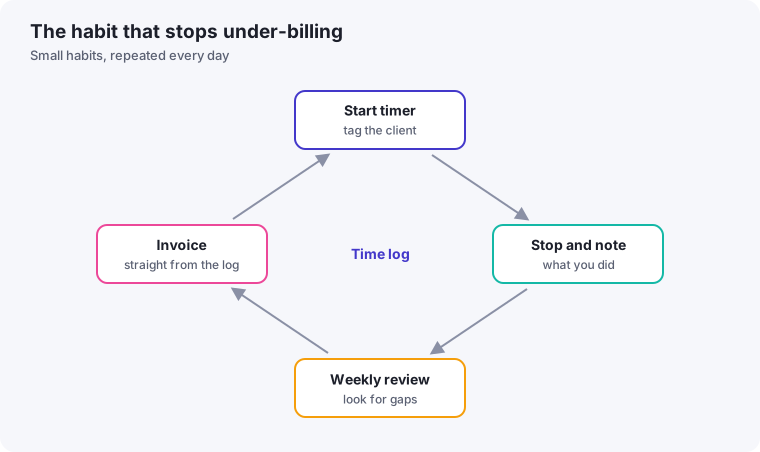
- Track time in real time, tagged by client, because memory loses small but valuable chunks.
- Decide your rounding rules in advance, and apply them consistently.
- Review your log weekly to catch missing time before you invoice.
Why hour tracking breaks down with multiple clients specifically
Tracking time for one client is straightforward — start a timer, do the work, stop the timer. The difficulty compounds with several clients, especially when you switch between them multiple times in a day: which timer is running right now, did you remember to switch it when you moved to a different client's task, and what do you do with time spent on something that touches two clients at once, like a shared piece of research.
A simple structure that scales past one client
One timer, always running, tagged by client
Rather than juggling separate timers per client, use a single time-tracking tool that lets you tag each entry with a client and task, and get in the habit of switching the tag the moment you switch tasks — not logging it retroactively at the end of the day from memory, which is where most under-logging happens.
Log in real time, not from memory
Reconstructing your day from memory at 5pm reliably underestimates actual time worked — small interruptions and quick tasks get forgotten entirely. Logging as you go, even roughly, captures far more of your actual billable time than any end-of-day reconstruction.
Round consistently, and decide the rule in advance
Whether you round to the nearest 15 minutes, 6 minutes, or bill in exact minutes, pick one rule and apply it consistently across every client, rather than deciding case by case — inconsistent rounding is both harder to track and harder to defend if a client ever questions an invoice.
Log short, non-obvious tasks immediately
Quick client replies, a short call, a five-minute revision — these are exactly the tasks that get forgotten by end of day precisely because they felt too small to matter individually. Log them the moment they happen, or immediately after, rather than trusting yourself to remember at the end of the day.
What to do about "invisible" time
Some real work genuinely doesn't fit neatly into a single client's timer — reading an industry article that informs multiple projects, general skill development, or administrative work covered in our admin batching guide. Decide upfront whether this kind of time is billable at all for your business model, and if so, to which category — don't leave it as an ambiguous gap that either gets billed inconsistently or written off entirely without a deliberate decision.
Reviewing your logged time, not just recording it
Time tracking has a second benefit beyond accurate billing: reviewing logged hours periodically shows you which clients or project types are actually taking longer than you priced for. If retros consistently show a certain kind of project running over your estimated hours, that's useful information for adjusting either your estimates or your rates for similar work going forward — not just a billing record, but a feedback loop on your own pricing accuracy.
Handling clients who question a logged total
Occasionally a client will ask about a specific invoice total that seems higher than expected. Real-time, detailed logging turns this from an uncomfortable, memory-based defense into a simple factual conversation — you can point to specifically what was done and when, rather than reconstructing a justification after the fact. This is one of the clearest practical payoffs of consistent logging: it protects you in exactly the moment a vague or after-the-fact record would leave you least prepared to respond confidently.
Choosing between simple timers and full time-tracking software
For freelancers with just a couple of clients, a basic timer app with manual client tags is usually sufficient — the same principles apply regardless of tool sophistication. Once you're managing five or more active clients, dedicated time-tracking software that integrates with your invoicing tool becomes worth the switch, since it removes the manual step of transferring logged hours into an invoice, which is itself a place where errors and omissions creep in. As with the project management decision covered in our software selection framework, match the tool's complexity to your actual client volume rather than adopting a heavier system than you currently need.
Fixed-price work still benefits from tracking time
Even when a project is priced as a flat fee rather than hourly, logging your actual time against it is worth doing anyway. It's the only reliable way to know whether your flat-fee pricing on a given type of project is actually profitable, or quietly running well over what you assumed when you quoted it — information that's easy to guess wrong about without an actual record to check against.
A simple time-log format
Whether you use a spreadsheet or a dedicated app, the fields that matter are few. Aim for a record you could hand to a client and have them understand:
| Date | Client | Task | Duration | Billable? |
|---|---|---|---|---|
| Mon | Client A | Revisions to draft, second round | 1 h 15 min | Yes |
| Mon | Client B | Replying to questions about the brief | 20 min | Yes (per agreement) |
| Mon | — | Updating my own tracker | 10 min | No |
The names and times are illustrative. The important columns are the client and the task description, because a specific description is what makes an invoice line easy for the client to accept.
Decide your rounding rule
Rounding is a policy decision, and you should choose it before your first invoice, not per client. Some freelancers round to the nearest fifteen minutes, others bill a minimum block for any contact, and some keep exact minutes. Whatever you choose, state it in your agreement so nobody is surprised, and apply it consistently. Consistency protects your credibility more than any particular rule does.
A weekly leakage check
Once a week, before you invoice, compare your log against the evidence in your calendar, sent emails and files. Ask three questions: Are there calls or meetings with no matching entry? Did I answer client messages that never made it into the log? Did I do work on a project that isn't reflected in any of my timers? Even one or two recovered entries per week add up over a year. Then decide whether the missing time is worth including on the invoice, or whether it belongs to work you have agreed to absorb.
Use your data to price future work
A time log is also a pricing tool. Compare the hours you actually spent on each project with what you quoted, and look for patterns: which type of project tends to overrun, which clients generate the most extra communication. Feeding that back into your estimates and your payment terms is one of the best returns on the habit.