Project management software comparisons online are mostly written for teams, ranking tools by collaboration features that don't matter much when you're the only person using the tool. If you've outgrown spreadsheets and are choosing dedicated software, the right decision framework looks different for a solo freelancer than for a ten-person team.
- Judge tools on how well they fit your workflow, and ignore the collaboration features built for teams.
- Test with three real projects for a week; demo data hides the friction.
- Set a decision date, or the search itself becomes procrastination.
Start with your actual workflow shape, not feature lists
Before comparing specific tools, get clear on the shape of your own work: do you run similar projects repeatedly (favoring a tool with strong templates), highly varied one-off projects (favoring flexibility over structure), or a mix of project work and ongoing retainer clients (favoring a tool that handles both recurring and finite work well). Most comparison articles rank tools on total feature count, which rewards complexity you likely don't need.
Three questions that matter more than the feature list
1. How fast can I see what's due this week, across all clients?
This is the single most common daily use of the tool, and if it takes more than a few seconds and a couple of clicks, the tool is working against your actual workflow regardless of how many other features it has.
2. Can I share a view with a client without exposing my whole workspace?
If clients ever need visibility into project status, check whether the tool supports a clean, limited client-facing view — not every tool does this well, and it's easy to overlook until you actually need it.
3. Does it handle both project-based and retainer-based work?
If your client mix includes both fixed-scope projects and ongoing retainers, make sure the tool doesn't force everything into a project-shaped structure that fits retainer work awkwardly.
Features that matter less for solo use than comparisons suggest
- Advanced team permission settings. Irrelevant with no team, and a common source of unnecessary complexity in tools built primarily for larger organizations.
- Extensive integration marketplaces. Useful in theory, but most solo freelancers end up using two or three integrations at most — check specifically for the ones you'll actually use rather than being swayed by a large total count.
- Heavy reporting and analytics dashboards. Built for managers reporting up to stakeholders — largely unnecessary when you already know exactly what's happening in your own business.
A practical evaluation process
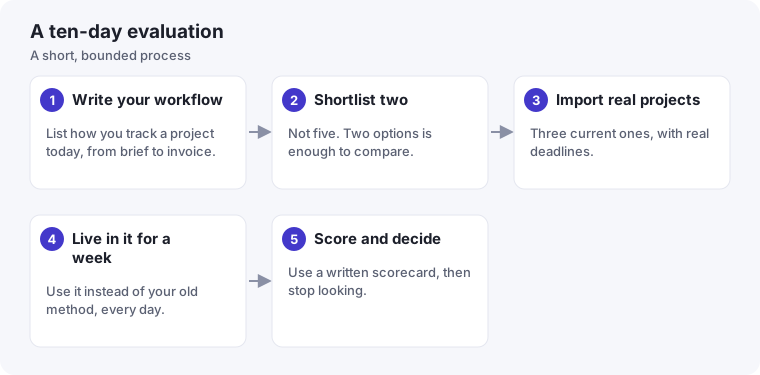
Rather than reading comparison articles indefinitely, pick two candidates that seem to fit your workflow shape from the questions above, and run one real, active client project through each for a week. Comparing based on actual use, even briefly, reveals fit far better than any feature comparison — you'll notice within days whether a tool's structure matches how you actually think about your work or fights against it.
What to do if nothing quite fits
It's fine to land on "a well-organized spreadsheet, plus a simple task list app" as your actual answer, especially at lower client volumes. The goal isn't to use dedicated software because it seems more professional — it's to use whatever setup actually makes your specific workflow easier to manage. For many solo freelancers, that turns out to be simpler than the tool landscape suggests.
Reducing switching cost from the start
Since a future switch is likely at some point as your business changes, it helps to keep your actual project data — client details, task lists, key documents — reasonably exportable rather than locked entirely into one tool's proprietary format. Most reputable tools support a basic CSV or similar export, which is worth confirming before committing rather than discovering the hard way during an eventual migration. This single check can turn a painful future switch into a manageable one.
Trial periods are for testing your actual workflow, not the demo data
Most project management tools offer a free trial, but many freelancers spend that trial exploring features with sample data rather than running one real, active project through it. The evaluation described earlier in this guide — running a genuine client project through your top candidates — only works if you actually do it with real tasks and real deadlines, not a demo board that doesn't reflect how messy actual client work tends to get. A tool that looks clean with sample data can feel completely different once real, evolving project details are in it.
Don't let the decision become the procrastination
It's worth naming a common trap directly: researching project management software can itself become a way to avoid the less comfortable parts of running a business, like pricing conversations or outreach. If you notice you've spent more time comparing tools than actually using any of them, that's a signal to pick a reasonable option and move on — a good-enough tool used consistently beats a perfect tool still being evaluated three months later.
A weighted scorecard
Feature comparisons feel objective but they rarely reflect what matters to you. A weighted scorecard forces you to decide what counts before you get distracted by shiny features. Give each criterion a weight from 1 to 3 (how much it matters to your work), then score each tool from 1 to 5 after your week-long trial, and multiply.
| Criterion | Weight (1–3) | Tool A (1–5) | Tool B (1–5) |
|---|---|---|---|
| I can see what is due this week across all clients in seconds | 3 | ||
| Adding a new client and project takes minutes | 3 | ||
| I can share a view with a client without exposing other clients | 2 | ||
| It handles both one-off projects and retainers | 2 | ||
| I can export my data if I leave | 2 | ||
| It works well on my phone for quick checks | 1 |
Adapt the criteria to your own work. The point is that the numbers come from your experience during the trial, not from a marketing page.
Red flags during the trial
- You keep updating your old spreadsheet "just in case", which means you don't trust the new tool yet.
- Simple actions take several clicks, and you find yourself avoiding them.
- You spend more time configuring views and automations than doing client work.
- You cannot explain in one sentence why this tool is better than the last one.
Plan your exit before you enter
Before you commit to a tool, check how you would leave it. Can you export projects, tasks and notes in a standard format? Is your data on your account rather than tied to a specific plan? Knowing you can leave makes you more willing to try, and it protects you if the tool changes its pricing or shuts down. Our article on outgrowing spreadsheets covers how to migrate without losing a week.