Admin work rarely takes long in isolation — sending an invoice, replying to a scheduling email, updating a spreadsheet. The real cost isn't the minutes each task takes; it's what happens to your focus every time you switch into "admin mode" and then back into actual client work. That switch has a hidden tax, and freelancers who scatter admin tasks throughout the day pay it dozens of times without noticing.
- Group small admin tasks into one or two protected blocks per week instead of handling them as they appear.
- Park anything that pops into your head in a single inbox, so you can act on it in the next block.
- Shorten the interval for tasks that are genuinely time-sensitive, and keep the longer interval for the rest.
The real cost of scattered admin
Research on task switching consistently shows that returning to focused work after an interruption takes longer than the interruption itself — your brain needs time to reload context. A two-minute invoice sent in the middle of a design task doesn't cost two minutes; it costs two minutes plus however long it takes to fully re-engage with what you were doing before. Multiply that by five or six small admin interruptions a day, and a meaningful chunk of your most productive hours disappears into transitions rather than actual work.
What batching actually means
Batching is simply grouping similar small tasks into one dedicated block, instead of handling them as they arrive. Rather than replying to each email the moment it lands, invoicing whenever you remember, and updating your tracker sporadically, all of that happens in one protected window — say, ninety minutes on a specific day — while the rest of the week stays free of admin interruptions.
Common categories worth batching
- Financial admin: sending invoices, following up on overdue payments, logging expenses.
- Inbox processing: clearing out your single inbox from the productivity systems guide — replying to non-urgent messages, filing things that need action later.
- Scheduling: confirming upcoming calls, sending calendar links, adjusting bookings.
- Light marketing: posting on social platforms, sending a newsletter, following up with old leads.
- Housekeeping: updating your project tracker, archiving completed work, backing up files.
A simple weekly batching schedule
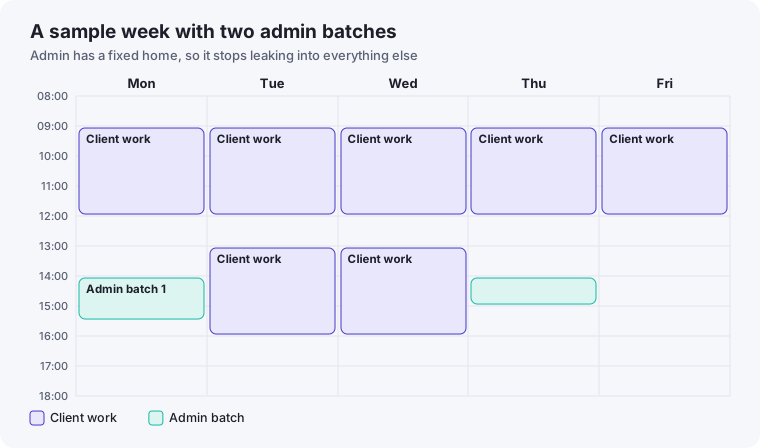
Most freelancers do well with one or two batching blocks per week rather than a daily ritual — daily batching just recreates the scattering problem at a smaller scale. A common pattern: one 60-90 minute block early in the week for financial admin and scheduling, and a second shorter block later in the week for inbox cleanup and light marketing. Anything urgent that surfaces between blocks still gets handled immediately — batching is for the tasks that don't actually need same-hour attention, not a rule that ignores real emergencies.
Making the batch block actually protected
The batching schedule only works if the block is treated the same way as the focus blocks from our time-blocking guide — marked busy, not "flexible," and not the first thing sacrificed when the week gets busy. Ironically, admin blocks are often the first ones people cancel under pressure, which guarantees the scattered pattern returns exactly when it's most costly to have it.
What to do with the urge to "just quickly" handle something
The hardest part of batching isn't building the schedule — it's resisting the impulse to handle a small task the instant you think of it, even though you know it'll only take a minute. A simple habit fixes most of this: instead of doing the small task immediately, add a one-line note to your inbox ("send invoice to Client B") and let your next batch block handle it. This preserves the interruption-catching benefit of writing it down immediately, without paying the context-switching cost of acting on it right then.
For freelancers who describe themselves as constantly busy but never quite sure where the day went, scattered admin work is one of the most common — and most fixable — culprits.
Tools that support batching without becoming another distraction
Batching doesn't require special software, but a few small aids help it stick. A single running list — the same inbox described in our productivity systems guide — where admin tasks get parked as they come to mind, rather than actioned immediately, is the main requirement. Beyond that, a calendar block marked clearly as "admin" (not left as an open, undefined slot) makes the batch itself easier to protect, since a labeled block is harder to casually overwrite than a vague gap in your schedule.
What happens in the first few weeks of switching to batching
Freelancers new to batching often report the first week or two feeling uncomfortable — tasks pile up in the inbox during the days between batches, which can initially feel like falling behind even though nothing is actually late. This discomfort typically fades once you see, batch after batch, that nothing important was lost by waiting a day or two, and that the batch block itself handles the backlog efficiently. If the discomfort doesn't fade and something genuinely feels forgotten, that's usually a sign the batching interval is too long for that particular category of task, not that batching itself doesn't work — shortening the interval for time-sensitive categories, while keeping longer ones for truly low-urgency admin, solves this without abandoning the system entirely.
A 90-minute admin batch agenda
An admin block works best when it has an order, because otherwise the first task that catches your eye takes over the whole session. Here is a structure you can adapt, with rough timings for a ninety-minute session:
| Minutes | Task | Why in this order |
|---|---|---|
| 0–10 | Empty your capture inbox into a single list | You see the whole picture before you choose what to do |
| 10–35 | Money: send invoices, chase overdue ones, log expenses | It is the admin with the biggest consequences, so it goes first while you are fresh |
| 35–60 | Scheduling and client messages that can wait a day | Confirms next week before it gets crowded |
| 60–80 | Housekeeping: update your tracker, archive finished work, back up files | Low-effort work that suits a tired brain |
| 80–90 | Write down next week's admin items you already know about | Makes the next batch quick to start |
What to do with tasks that cannot wait
Batching does not mean ignoring anything time-sensitive. Before you adopt the system, sort your admin into three groups: things that really need same-day attention (a payment problem, a change to a deadline), things that can wait a day or two, and things that can wait a week. Only the middle and last groups go into batches. If you find that too many items land in the first group, the issue is usually unclear expectations with clients rather than the batching system, and our guide to handling urgent client requests covers that.
Track whether it is working
After three or four weeks, ask yourself two questions. Do you finish client work with fewer interruptions? And did anything genuinely important get delayed because it sat waiting for a batch? If the first answer is yes and the second is no, the system is working. If something important was late, add a short mid-week check for that category, rather than going back to handling everything as it arrives.