Automation platforms connect different apps so that an action in one triggers something in another — a new form submission creates a task, a signed contract sends a welcome email. The three most commonly recommended options for freelancers are Zapier, Make, and n8n, and the right one depends far more on your comfort with complexity than on which is objectively "best."
- Pick the platform by how much technical setup you are willing to maintain, not by the length of its feature list.
- Start with one automation that removes a task you do every week, and keep a written record of it.
- Every automation needs an alert for when it fails; silent failures are the real cost.
Zapier: the simplest starting point
Zapier's core idea is a "zap" — a simple trigger-and-action pair, like "when a new row is added to this spreadsheet, send this email." It has the largest library of app integrations and the gentlest learning curve of the three, which makes it the right starting point if you've never built an automation before. The tradeoff is cost: pricing scales with the number of tasks you run, and a workflow that seemed cheap at low volume can get expensive as your automation use grows.
Make: more power for less money
Make (formerly Integromat) offers a visual, flowchart-style builder that supports more complex logic than Zapier's simple trigger-action model — branching paths, conditional logic, multiple actions from one trigger — generally at a lower cost for the same volume of automation. The tradeoff is a steeper learning curve: the visual builder is powerful, but takes longer to become comfortable with than Zapier's simpler interface.
n8n: maximum flexibility, maximum setup
n8n is typically self-hosted, which removes per-task pricing entirely but requires more technical comfort to set up and maintain. It supports the most complex workflows of the three and can connect to virtually anything with an API, but expects you to be comfortable with a bit of technical configuration — this is generally the right choice only if you're already comfortable with tools like this, or specifically want to avoid ongoing subscription costs at high automation volume.
A simple way to choose
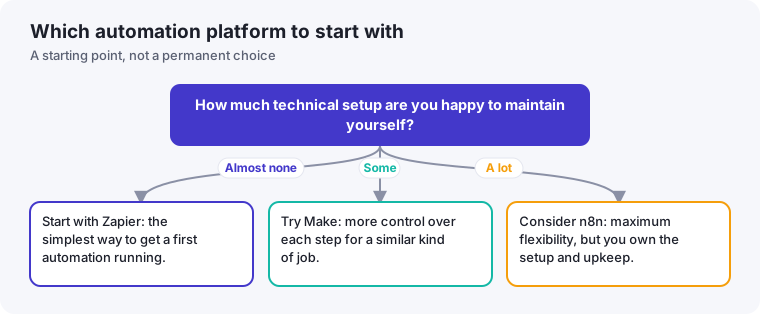
- Never built an automation before: start with Zapier. The learning curve is the lowest, and you'll find out quickly whether automation is worth investing more time into.
- Comfortable with basic automation and want more complex logic at lower cost: Make is the natural next step.
- Technically comfortable, running automations at real volume, or want to avoid per-task pricing long-term: n8n is worth the steeper setup.
The mistake to avoid regardless of platform
The most common automation mistake isn't picking the wrong tool — it's building an elaborate multi-step automation before confirming the underlying manual process is actually worth automating. Before building anything, make sure you've done the task manually enough times to know it's genuinely repetitive and stable — automating a process you're still actively changing means rebuilding the automation every time the process changes, which can cost more time than it saves.
Start with one automation, not a system
It's tempting, once you see what's possible, to try to automate your entire workflow at once. Resist this. Pick the single most repetitive, most annoying manual task you do — a specific step in client onboarding is a common first choice — and automate only that. Once it's reliably working, add the next one. Freelancers who try to build a complete automated system in one sitting are the ones most likely to abandon the whole platform after getting stuck on an edge case in step four of six.
Budgeting for automation realistically
Beyond the subscription cost, factor in the setup time honestly when deciding whether an automation is worth building. A workflow that takes three hours to build and saves ten minutes a week has a payback period of roughly eighteen weeks — a reasonable investment if the task is genuinely permanent, a poor one if your process is likely to change before then. This calculation is easy to skip in the excitement of building something that works, but it's the actual measure of whether an automation was worth the time spent creating it.
A note on combining automation with AI tools
Automation platforms increasingly integrate directly with AI tools — for example, an automation that pulls a new client inquiry, uses an AI assistant to draft a personalized first response, and adds the lead to your tracker, all without manual intervention. This kind of combined workflow can be genuinely powerful, but it also compounds the risk of an unnoticed error, since an AI-drafted message going out incorrectly is a more visible mistake than a simple data-entry automation failing silently. Review AI-generated outputs within an automated workflow more carefully than you might review a purely mechanical step, at least until the combination has proven reliable over many real runs.
Keep a simple record of what you've automated
As automations accumulate over time, it's easy to lose track of exactly what's running and why. A short running list — what the automation does, which tool it lives in, and when it was last checked — makes troubleshooting far faster when something eventually breaks, and makes it obvious which automations are still relevant versus quietly built for a process you no longer use.
A one-hour test before you commit
Feature pages describe what a platform can do; they say little about how it feels to build with it on a Tuesday afternoon with a client waiting. A short, structured test tells you far more than a comparison chart. Pick one real task you repeat weekly, such as "when a client fills in my intake form, create a folder and send a confirmation email", and try to build it in the platform you are considering, with a timer running.
Pay attention to three things while you build. First, how long it takes to reach a working version, including the time spent reading documentation. Second, how clearly the tool shows you what happened in each step when you run a test. Third, how much you understand the finished automation the next day, without looking at notes. If you cannot explain your own automation to yourself after sleeping on it, it will be painful to fix when it breaks.
Keep an automation register
Automations tend to be forgotten precisely because they work. Six months later something changes, an app updates or you change your email address, and a step quietly stops running. A simple register, kept in a spreadsheet or a note, prevents that. One row per automation is enough:
| Field | What to write |
|---|---|
| Name | A plain description, such as "New intake form → client folder" |
| Trigger | What starts it (form submitted, invoice paid, email received) |
| Actions | What it does, in the order it happens |
| Accounts used | Which logins it depends on, so you know what to update if you change one |
| Failure alert | How you will find out if it stops (an email to yourself, a weekly check) |
| Review date | When you will next confirm it still does what you want |
What to do when an automation breaks
Assume it will happen and decide the response in advance. When you notice a failure, first work out what was missed while it was down: which forms were not processed, which invoices did not go out. Handle those manually, since clients care about the outcome and not about your tooling. Only then look for the cause. Most failures come from expired logins, renamed fields or a service changing how it works, and the platform's run history usually points to the step that stopped.