AI notetakers join your video call, record it, transcribe it, and generate a summary — usually with action items pulled out automatically. For freelancers who spend a lot of time on client calls, this sounds like an obvious time-saver. Whether it actually is depends heavily on how many calls you take and what kind of calls they are.
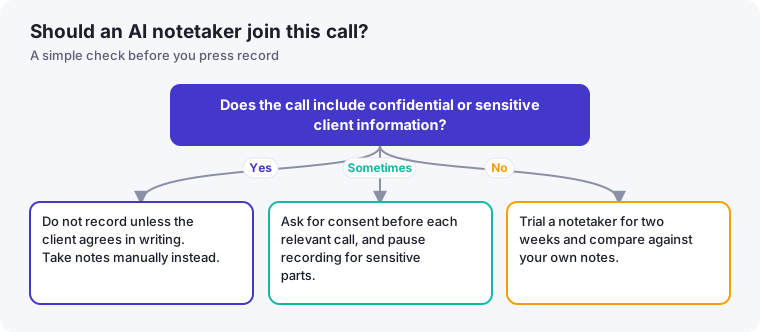
- Confidentiality comes first: decide what you may record before you decide which tool to use.
- Ask clients for consent before any call is recorded or transcribed.
- Treat AI summaries as drafts, and check names, numbers and commitments against your own memory.
What these tools actually do
Tools in this category, like Fathom and Granola, connect to your video conferencing app (Zoom, Google Meet, and similar), record the session, and produce a transcript plus a structured summary shortly after the call ends. Some support customizable templates, so a sales call generates a different summary format than a project status update or a design review.
When it's genuinely worth it
- You take more than 3-4 client calls a week. Below that volume, the time saved on manual note-taking is real but modest. Above it, the hours writing up notes afterward add up fast.
- You tend to forget action items without a written record. An automatic summary is a safety net that doesn't depend on you catching everything in real time while also actively participating in the conversation.
- You bill by the hour and calls compete with billable focus time. Time spent writing up notes after a call is time not spent on paid work — automating it has a direct financial argument, not just a convenience one.
When it's probably not worth it yet
- Your calls are infrequent or short. If you take one client call a week, manual notes cost you a few minutes — not enough to justify a new tool and workflow.
- Your calls involve highly sensitive client information. See the confidentiality section below before recording anything you're not certain you can.
- You're already comfortable with a lightweight manual system, like typing three bullet points during the call itself. Some freelancers genuinely retain information better by writing a little as they go, and a notetaker adds a step rather than removing one.
Client confidentiality: read this before you turn one on
This is the part most "top AI notetaker" roundups skip. Recording a client call and sending the transcript to a third-party AI service has real confidentiality implications, especially if you work under an NDA or in a regulated field (legal, healthcare-adjacent, financial). Before using any notetaker:
- Check your existing client contracts and NDAs for any restrictions on recording or third-party data processing.
- Tell clients you're recording and using an AI summarization tool — most jurisdictions require at least one-party consent to record a call, and some require all-party consent.
- Review the notetaker's data policy: whether transcripts are used to train models, how long data is retained, and whether you can delete it.
None of this means the category is unsafe to use — it means it deserves the same due diligence you'd apply to any tool that touches client data, not blind adoption because a summary saves you fifteen minutes.
How to decide
If you're on the fence, try a free trial on your next few calls with a client you have a comfortable relationship with, and compare the AI summary against notes you'd normally take yourself. If the summary consistently catches things you'd have missed, it's earning its place. If you're spending as much time editing the AI summary as you would have spent writing your own notes, it isn't — yet.
Alternatives if you'd rather not record calls at all
If confidentiality concerns or client sensitivity make an AI notetaker a poor fit, a few lighter-weight alternatives capture most of the benefit without recording anything:
- The three-bullet method. During the call, jot down only three things in real time: what was decided, what you owe the client, and what they owe you. This takes seconds and covers the information that actually matters for follow-up.
- A five-minute post-call voice memo. Instead of typing notes, record a quick voice memo to yourself summarizing the call immediately after it ends, while it's fresh. This is faster than typing and doesn't involve sharing anything with a third-party service.
- A standing recap email to the client. Sending a short "here's what we covered and what happens next" email after every call creates a written record for both sides, and clients generally appreciate the clarity regardless of how you produced it.
What actually determines the right choice
The decision isn't really about which tool has the best transcription accuracy — most modern options handle that reasonably well. It comes down to your specific mix of call volume, the sensitivity of what's discussed, and how much you personally retain from calls without a written aid. A freelancer taking ten sales calls a week about non-sensitive projects has a very different calculus than a consultant discussing confidential financial details with three long-term clients. Match the tool to your actual situation rather than adopting whatever the loudest recommendation online happens to be.
A short consent message you can adapt
Many freelancers avoid recording tools because asking permission feels awkward. It helps to have the wording ready, so the request is a routine part of setting up a call. Something like this, sent when you schedule the meeting, keeps it low-key:
I use an AI notetaking tool to record and summarize calls so that I don't miss any action items. Are you comfortable with that for our call on Thursday? If you'd rather not, no problem at all. I'll take notes by hand instead, and I can always pause the recording if we get to anything sensitive.
Notice that it offers a clear alternative and treats a "no" as completely normal. If the client hesitates, take the hint and take notes yourself. You lose almost nothing, and you keep the trust that the recording was supposed to support.
How to review an AI summary in three minutes
A summary can sound confident and still be wrong. After each call, do a quick pass before you send anything to the client or act on it:
- Names and roles. Check that the right person is credited with each decision or request.
- Numbers and dates. Budgets, deadlines and quantities are the most damaging things to get wrong.
- Commitments. Confirm that each action item is something someone actually agreed to, and that the owner is correct.
- Missing items. Skim your own memory of the call for anything important the summary left out.
A manual notes template that takes two minutes
If you decide against a tool, a consistent structure gets you most of the benefit. Keep one note per call with four headings: Decisions made, Things I need to do (with dates), Things the client needs to do, and Open questions. Write the action items in the last two minutes of the call, reading them back aloud so the client can correct you in real time. That single habit removes much of the ambiguity a recording is meant to solve.