A freelancer's calendar has a specific failure mode: without an employer setting boundaries, client calls expand to fill every open slot, because saying yes is easier than protecting time you haven't explicitly claimed. Time blocking fixes this by treating focus time as an appointment with yourself — one that's just as real as a client meeting.
- Time blocking works because it claims your time before other people do.
- Leave buffers between blocks, and do not fill every hour of the week.
- AI scheduling tools can help, but you still decide which blocks matter most.
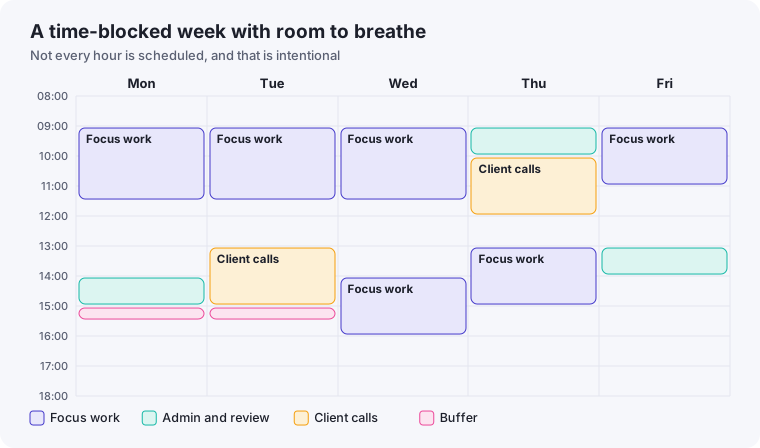
The core idea, without any tools
Before adding software, the manual version of time blocking is simple: pick the hours when you do your best focused work — for many freelancers, mornings — and put a recurring block on your calendar labeled as busy. Not "flexible," not "tentative." Busy, the same as it would show if you had a client meeting booked.
The habit that makes this work isn't the calendar entry itself — it's actually treating that block as unavailable when a client asks for a call during it, the same way you would if another client had already booked that slot.
Where AI scheduling tools genuinely help
Manual time blocking works, but it has one weak point: every time someone requests a meeting, you have to manually check your blocks and negotiate around them. AI-assisted scheduling tools remove that friction in a few specific ways:
- Automatic rescheduling around focus blocks. Some scheduling tools will automatically move flexible meetings to protect a defined focus block, rather than you manually declining and re-proposing times.
- Smart booking links. Instead of back-and-forth emails to find a time, a booking link that only exposes your actually-available slots (respecting your protected blocks) removes an entire email thread per meeting.
- Buffer time enforcement. Automatically adding a 10-15 minute buffer between back-to-back client calls, so you're not walking straight from one call's context into another's.
What to watch out for
AI scheduling tools work best when your calendar is already reasonably organized — they're bad at fixing chaos, only at maintaining order you've already established. If your calendar currently has no structure at all, spend a week doing manual time blocking first. Adding automation on top of a messy calendar mostly automates the mess.
It's also worth being deliberate about how much control you hand over. Fully automated rescheduling that moves client meetings without your explicit review can create awkward surprises for clients who don't expect their booked time to shift. Many freelancers find a middle ground: automation suggests changes, but a human — you — confirms them before anything moves.
A simple weekly structure to start with
- Protect 2-3 focus blocks per week for deep work that genuinely needs uninterrupted time — not everything does.
- Batch client calls into 1-2 days rather than scattering them across the week, so focus days stay actually protected.
- Leave one buffer block unscheduled for the inevitable urgent request, so it doesn't have to cut into either your focus time or your batched call days.
This structure pairs naturally with the single-inbox and daily close-out habits from our productivity systems guide — the calendar handles when things happen, while the daily close-out handles what needs to happen.
Common time-blocking mistakes
Blocking too much of the week
Freelancers new to time blocking often try to schedule every hour, which turns the calendar into a rigid plan that breaks the first time something urgent comes up — and then gets abandoned entirely. Block the two or three periods that matter most, and leave the rest of the week flexible by design, not by neglect.
Scheduling focus blocks at the wrong time of day
Copying someone else's "I do deep work at 6am" routine rarely works if it doesn't match your actual energy patterns. Pay attention to when you naturally focus best over a couple of weeks before locking in a recurring block — the block only works if you can actually use it productively when it arrives.
Not communicating the boundary to clients
A block on your personal calendar does nothing if clients don't know it exists and keep requesting that exact slot. Mention your general availability windows when scheduling — "I take calls Tuesday through Thursday afternoons" — so clients aren't surprised when mornings aren't offered as an option.
When time blocking isn't the right fix
If your schedule problem is that you have too much work rather than poorly organized time, no amount of calendar structure will fix it — that's a capacity or pricing problem, not a scheduling one. Time blocking helps you protect and use the hours you have more deliberately; it can't manufacture hours that don't exist. If you're consistently blocking focus time and still not fitting in your workload, it's worth stepping back to look at whether you're taking on too many clients relative to your actual capacity.
A four-week rollout
Blocking your whole week on the first day rarely lasts. A gradual introduction has a much better chance of becoming a habit:
- Week 1: Block only your best focus time, one block per day, and see how often you keep it.
- Week 2: Add a block for client calls, so meetings cluster on set days and times.
- Week 3: Add an admin block and a weekly review. Adjust the length of every block to reality.
- Week 4: Add buffers between blocks, and review what needs to change.
Buffers are not wasted time
Plans made without buffers assume nothing will overrun, which is never true. Leave fifteen to thirty minutes after calls and between demanding tasks, to write notes, take a break or absorb the overrun. If a buffer goes unused, it becomes free time. If your day always seems to overrun despite buffers, your estimates are too optimistic, and it is worth recording how long tasks really take for a couple of weeks.
Configuring an AI scheduling tool sensibly
If you use a tool that proposes or moves blocks automatically, spend a little time on its settings first. Enter your real working hours and days, mark your focus time as busy so that booking links cannot take it, set a minimum notice period for new bookings, and limit the number of calls per day. Check the first few weeks of its suggestions yourself. The tool follows the rules you give it, so weak rules produce a well-organised bad week.
Tell clients how you schedule
A visible booking link with limited slots, together with a short line such as "I keep mornings free for project work, so calls are available from noon", sets expectations without a discussion. Most clients are happy to book within the windows you offer, as long as they are clear and you are reliable within them.