Templates save time by handling the repetitive, predictable parts of your work the same way every time. Custom handling preserves the personal, tailored quality that often justifies working with a freelancer over a larger, more process-heavy agency in the first place. The freelancers who burn out on admin usually template too little; the ones whose work starts to feel generic to clients usually template too much. The skill is knowing which parts of your business belong in which category.
- Template what is repetitive and low-stakes, and personalise what shapes the client relationship.
- A good template has a fixed structure and a place for a personal touch.
- Review your templates every few months, and retire the ones you no longer use.
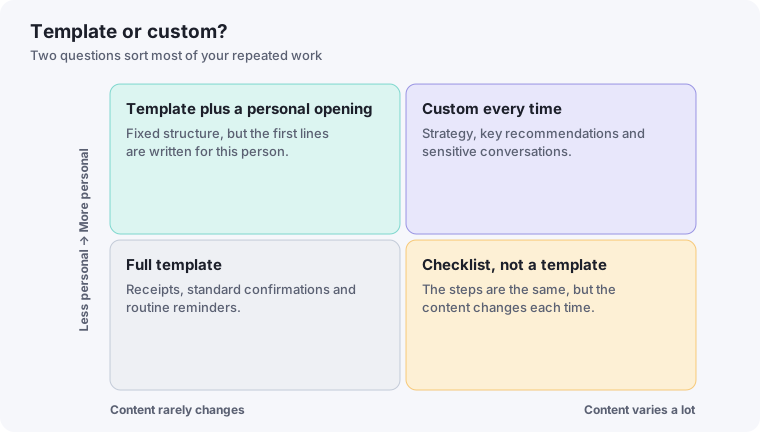
A simple test for what to templatize
Ask of any recurring task: does the client benefit from this being personalized, or would they genuinely not notice if it followed the same structure every time? A contract, an intake questionnaire, or an onboarding checklist rarely benefits from being reinvented per client — the content changes, but the structure and process add no value by being custom. A welcome message or a proposal's opening paragraph, by contrast, is exactly where clients notice — and appreciate — genuine personalization.
What almost always belongs in a template
- Contracts and legal documents. Consistency here reduces risk, not just time — a template you've reviewed once is more reliable than a document rewritten from memory each time.
- Intake and discovery questionnaires. The questions you need answered rarely change meaningfully between clients in the same line of work.
- Standard project status updates. A consistent format helps clients quickly parse what's changed, and saves you from deciding on structure every single time.
- Onboarding and offboarding checklists. Covered in more depth in our onboarding automation guide — this is one of the clearest template wins in a freelance business.
What almost always deserves custom handling
- The actual deliverable. This should go without saying, but it's worth stating plainly: templating the process around the work is fine; templating the work itself defeats the reason a client hired a specific freelancer rather than a generic service.
- Proposal openings and value propositions. As covered in our AI proposal-writing guide, this is exactly where generic language costs you the most credibility.
- How you handle a client's specific concerns or complaints. A scripted response to a genuine concern reads as dismissive; this is a moment that calls for real attention, not process.
The middle ground: templated structure, personalized content
Many of the best workflows aren't purely templated or purely custom — they're a template with clearly marked spots for personalization. A proposal template with a fixed structure but a genuinely rewritten opening paragraph per client, or a welcome email template with one custom sentence referencing the client's specific project, captures most of the time savings of templating while preserving the parts that actually read as personal.
Revisiting the balance as you grow
What belongs in each category shifts as your client volume changes. At two or three clients, almost everything can be custom without much cost. At ten or more, the same level of customization everywhere becomes unsustainable, and templating the operational layer — while keeping the client-facing, judgment-driven parts custom — becomes necessary just to keep up. Revisit this balance periodically rather than assuming whatever worked at your current volume will keep working as it grows.
Auditing your current templates periodically
Templates that were well-designed a year ago can quietly become outdated as your services, rates, or typical client type shift. A template built for a different phase of your business — referencing services you no longer offer, or written in a tone that doesn't match your current client base — costs you more than having no template at all, because it actively sends the wrong signal while looking polished. Reviewing your core templates every few months, ideally during a broader check like the monthly review mentioned in our weekly review guide, catches this drift before a client notices it first.
Building templates from your best actual work, not from scratch
The strongest templates usually aren't designed abstractly — they're extracted from a specific instance that worked unusually well. The next time a proposal lands a great client, or a project update gets a genuinely positive response, save that specific document as the basis for your next template, rather than starting a new one from a blank page. This grounds your templates in language and structure that's already proven to work, rather than in what merely seems reasonable in the abstract.
A quick gut check for any new template
Before rolling out a new template across all clients, send it to just one or two first and pay attention to how it lands. A template that reads well in isolation can still feel slightly off once an actual client responds to it — small adjustments based on one or two real reactions tend to catch issues that reviewing the document alone, no matter how carefully, would miss.
The anatomy of a good template
Templates fail when they try to be finished documents. The better ones separate what is fixed from what must change. A useful template has four parts: a fixed structure (the headings and order), fixed wording where the content really is the same, clearly marked gaps for the parts that must be personalised, and a short note at the top reminding you what to check before sending. Highlighting the gaps in a distinct colour makes it much harder to send something with a placeholder left in.
Three lines of personalisation
You do not need to rewrite a template to make it feel personal. Adding three specific lines usually changes how it reads: one that refers to something the client said or did, one that connects your work to their situation, and one that looks ahead to what happens next. A message such as an onboarding email can keep ninety percent of its wording and still feel written for a single person if those three lines are genuine.
A template audit table
Every few months, list your templates and decide what to do with each. This takes twenty minutes and stops your library from growing without anyone using it:
| Template | Last used | Did it work? | Action |
|---|---|---|---|
| Welcome email | When you last onboarded | Clients replied with questions I could have answered? | Keep, update, merge or delete |
| Proposal outline | |||
| Invoice reminder |
Build from your best real work
The strongest templates come from things that actually went well. When a message, proposal or process works, save a copy, strip out the client-specific details and mark the gaps. Over time you accumulate a small library that reflects how you really work. If you use AI to help draft, keep those best examples as the reference, so its suggestions stay close to your own voice.