Freelancers with several active clients spend a surprising amount of time simply reloading context — remembering where a project left off, what was last discussed, and what's expected next — every time they switch between clients during the day. This overhead is invisible in any single switch but adds up to real lost time across a week of moving between five or six different projects.
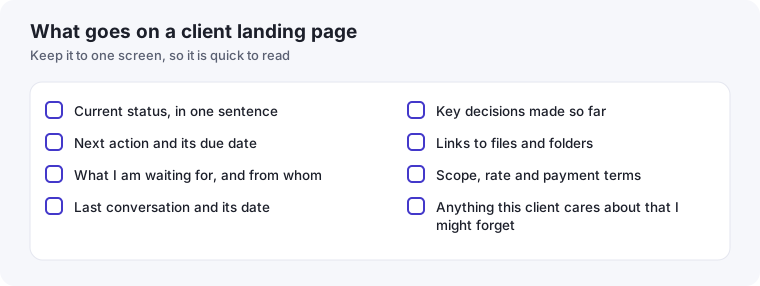
- Give every client one landing page that answers "where were we?" in under a minute.
- Update it at the end of each work session, while the context is still in your head.
- Take a 60-second glance before switching clients, not just a note after.
Why context switching costs more for freelancers than employees
An employee on one team switches between related tasks within a shared context. A freelancer switching between clients is often moving between entirely different industries, tools, communication styles, and project histories multiple times a day — a much larger context shift each time, and correspondingly higher reload cost if there's no system supporting the transition.
The fix: a landing page per client, not a search per client
The core idea is simple: every active client should have one document or view that answers "where did we leave off" in under thirty seconds, without you needing to scroll through old messages or reconstruct the current state from memory. This builds directly on the single-view-per-client approach from our productivity systems guide — the context-switching problem is exactly why that structure matters.
What belongs on that landing view
- Current status in one line: what phase the project is in right now, not a full history.
- The very next action: the single next thing you (or the client) need to do, so you're never re-deciding this from scratch.
- Open questions: anything unresolved that needs an answer before you can move forward.
- Key context that doesn't change often: brand guidelines, login details, or preferences that would otherwise require digging through old messages every time.
The transition habit that makes this work
The system only pays off if you actually update the landing view before switching away from a client, not just when you happen to remember. A simple habit: before moving to the next client, spend thirty seconds updating that client's status and next action based on what just happened. This costs almost nothing in the moment and saves significantly more the next time you return to that project, whether that's later the same day or a week later.
Batching by client, not by task type, where possible
Beyond the landing-page system, reducing the raw number of switches helps directly. Where your schedule allows it, grouping work by client — an hour on Client A's project, then an hour on Client B's, rather than bouncing between both every fifteen minutes — reduces how often you pay the reload cost at all, independent of how good your notes are.
When this matters most
This system pays off most noticeably when returning to a client after a gap of several days or weeks — exactly the situation where memory alone fails completely, and exactly the situation a good landing view handles effortlessly. If you've ever spent the first ten minutes of a client call trying to remember what was actually discussed last time, that's the specific problem this system is built to eliminate.
Adapting the system for very short client engagements
For a quick, one-off project — a single deliverable, a short consulting call — a full landing-page system is overkill; the context simply doesn't accumulate enough to need it. Reserve this structure for clients with genuine ongoing relationships or multi-week projects, where the cost of losing context between sessions is real. Applying heavy process to every client regardless of engagement length is itself a form of the over-templating problem covered in our templates versus custom workflows guide — matching the system's weight to the relationship's actual complexity matters as much as having the system at all.
What this looks like in practice after a few months
Freelancers who adopt this system consistently often describe a specific shift: client calls that used to start with a few minutes of "remind me where we left off" start instead with you already knowing the current state before the call begins, because you glanced at the landing view beforehand. This small change shifts the client's perception meaningfully — a freelancer who clearly remembers project details without being reminded reads as more attentive and more organized, even though the actual mechanism is a simple habit rather than exceptional memory.
A small addition worth considering: a pre-switch glance, not just a post-switch update
Beyond updating context when you leave a client, briefly reviewing that same landing view right before you return to them — even a fifteen-second glance before opening an email reply or joining a call — closes the loop fully. Updating alone captures the information; reviewing it right before re-engaging is what actually prevents the reload cost, since the information is only useful if it's back in your working memory at the moment you need it.
An example client page (hypothetical)
Here is how a landing page might look for an imaginary client, to show the level of detail that is useful. It fits comfortably on one screen:
| Field | Example entry |
|---|---|
| Status | Second draft sent; waiting for feedback |
| Next action | Send revised version by Thursday |
| Waiting on | Client: comments on section three, and the final logo file |
| Last conversation | Call on Monday. They prefer a shorter introduction |
| Decisions | Keep the blue palette; drop the video idea for now |
| Links | Project folder, shared brief, invoice thread |
| Terms | Two revision rounds included; invoice at delivery |
| Remember | Prefers short messages; replies best before ten |
The 60-second switch routine
The cost of switching is mostly the effort of rebuilding context, so practise a short routine every time you change clients. Before you leave the current one, spend a minute writing where you stopped and the very next step. Before you start the next, spend a minute reading that client's page and stating aloud what you are about to do. Two minutes in total, and you rarely need to search your inbox to remember where you were.
Reduce the number of switches
The best switching habit is switching less. Where you can, group work by client into half-day blocks, and answer messages in batches instead of in between. Our guides on batching admin work and time blocking show how to arrange your week so that each client gets your full attention for a stretch, rather than a scattered sequence of interruptions.