Ask ten freelancers what productivity system they use, and eight of them will name an app. That's backwards. A tool can support a system, but it can't replace one — and the freelancers who feel constantly behind usually don't have a tool problem, they have a system problem.
- A system is a set of habits; a tool only holds it.
- The three parts are one inbox, a daily close-out and a single view per client.
- Add a short weekly check, and only then decide which tools would help.
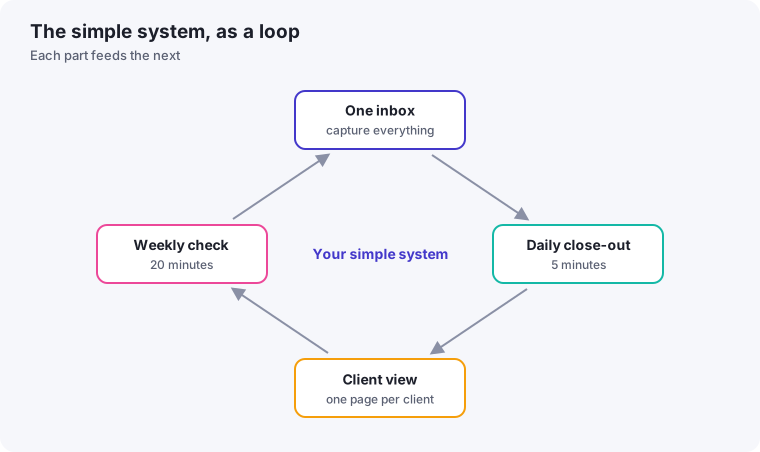
Here's a system you can set up in under an hour, using nothing but a notebook, a calendar, and a document. Once it's running, you can layer software on top of it if you want. But the system works with or without the apps.
Why "just use an app" doesn't fix overwhelm
Most productivity apps are organizational containers — they give you a place to put tasks. They don't tell you which tasks matter, when to do them, or what to do when three clients need something "urgent" on the same afternoon. That decision-making layer is the actual system, and it's what most freelancers skip straight past on their way to downloading yet another app.
The result is familiar: a task manager with 140 items in it, half of them stale, and a nagging sense that something important is falling through the cracks. Adding a second app rarely fixes this. A clearer system usually does.
The three-part system
1. One inbox for everything
Every task, request, and idea — whether it arrives by email, Slack message, text, or a thought in the shower — goes into exactly one place first. Not four different apps depending on where the request came from. One inbox.
This can be a notes app, a plain text file, or a single list in whatever task manager you already have. The tool matters far less than the rule: nothing skips the inbox, even "quick" things. Quick things are exactly what falls through the cracks, because they feel too small to write down and too easy to forget once you don't.
2. A daily close-out, not a daily to-do list
Most productivity advice tells you to plan your day in the morning. For freelancers juggling client work, mornings are often already reactive — messages have piled up overnight, and by the time you've answered them, the "plan the day" window is gone.
Instead, close out each day by spending 10 minutes doing three things: clearing your inbox from part one into either a calendar slot or a project list, picking the one thing that absolutely must happen tomorrow before anything else, and noting anything you're waiting on from someone else (an approval, a file, a payment) so it doesn't quietly stall.
You start the next morning already knowing your one priority, instead of deciding it cold while messages are already coming in.
3. A single view per client, not per task type
Here's where most systems break down for freelancers specifically: they're organized by task type (calls, writing, design, admin) instead of by client. But freelance work is fundamentally client-shaped — you need to see everything related to Client A in one place, not scattered across five categories.
Keep one simple running document or list per active client with three sections: what's currently in progress, what's next, and open questions or blockers. When a client messages you, you open one document and immediately have full context. No searching across tools.
Where AI and automation fit in
Once this system is running manually, it's worth looking at where a tool can remove friction — not add a new place to check. A calendar assistant that protects focus time, a transcription tool that turns client calls into notes automatically, or an automation that moves a new inquiry straight into your inbox can all save real time. But they're improvements to an existing system, not a substitute for one.
We cover specific tools worth considering in our roundup of AI productivity tools and in our guide to time blocking with AI calendar tools.
A productivity system doesn't need to be elaborate to work. It needs to be consistent enough that you trust it — trust that nothing important is invisible, and trust that you know what to do next without having to reconstruct the whole picture every time a client reaches out.
Common mistakes when setting this up
Building the perfect system before using it once
It's tempting to spend a weekend designing color-coded categories, tagging schemes, and folder structures before writing down a single real task. Skip this. Start using the three-part system with whatever plain notebook or document you already have open right now. You'll learn far more about what you actually need from one real week of use than from any amount of upfront planning.
Treating the daily close-out as optional on busy days
The 10-minute close-out is most valuable on the days you're tempted to skip it — the days that were chaotic enough that something is likely to fall through the cracks. Freelancers who drop this habit specifically on hard days tend to have the system quietly stop working within a couple of weeks, then blame the system instead of the inconsistency.
Letting the single inbox become a second parking lot
The inbox only works if it gets emptied regularly during the close-out. If items sit in it for weeks, it stops being a fast capture point and becomes just another cluttered list — which defeats the purpose. If your inbox is growing faster than you're clearing it, that's a signal to shorten your close-out ritual, not to abandon it.
How to know it's working
You'll know this system has taken hold when you stop feeling a small jolt of anxiety every time a client messages you — because you already have a place that message is going to land, and a process for deciding when you'll deal with it. That shift, more than any specific metric, is the real sign of a productivity system that fits how you actually work.
Set it up in one afternoon
The best time to start is before you feel ready, because the system gets better through use. Here is a simple set-up you can complete in a couple of hours:
- Choose your inbox. It could be a notebook, a note on your phone or a single document. Whichever it is, it must be the one place you write things down.
- Empty your head into it. Spend fifteen minutes writing every open task, promise and worry you can think of, without organising it.
- Create one page per client. On each, list current work, next step, deadlines and the date of your last conversation.
- Sort the inbox. Move each item to the right client page or to a small "everything else" list.
- Set a daily reminder for a five-minute close-out at the end of your workday.
- Book a weekly slot for a twenty-minute review. Our weekly review guide shows how.
What a daily close-out looks like
The close-out is deliberately small. In five minutes you look at your inbox and clear it, note anything that changed for each client you touched today, and choose the first task for tomorrow. Write it at the top of the page you will open first. When you sit down the next morning, you already know where to start, which removes the time and mental energy that would otherwise go on deciding.
Paper or digital?
Both work, and neither is better in principle. Paper is fast to capture and has no notifications. Digital is searchable and available on every device. Choose based on where you are most likely to capture things reliably. If you catch yourself avoiding the system, ask whether the friction of the medium is the reason, and switch. The system is the habit, and the medium can change.
Add tools only when you feel a specific gap
After a month, look at what frustrates you. If it is finding old information, you may want searchable notes. If it is repeating the same messages, templates or automation could help. Choose a tool to fix that one problem, using the methods in our guides on templates and AI tools. That order, habits first and tools second, keeps the system from becoming another thing to maintain.